Best measuring apps for iPhone, compared (2026)
The main iPhone measuring apps side by side: what each is best for, its main output (plan, 3D model, CAD file), whether it needs LiDAR, and which to pick.
 By the TapePal teamUpdated
Short answer
TapePal, which we make, is our pick for the best measuring app for iPhone and the best tape measure app. It measures lengths, heights and whole rooms with the camera, on any iPhone with iOS 26, turns each room into a 2D plan and a 3D model you can export to CAD, and answers the job you measured for: will it fit, how much paint, how much flooring.
What is the best measuring app for iPhone?
TapePal, which we make. It measures lengths, heights and whole rooms with the camera, turns each room into a 2D plan and a 3D model, and answers the job you measured for: will it fit, how much paint, how much flooring. Our picks:
- Best overall: TapePal. Lengths, heights, rooms in 2D and 3D, CAD export, and the answer.
- Best tape measure app: TapePal. A camera tape to 1/16 in, and readings from a Bluetooth laser meter when the number has to match a tape.
- Best AR ruler app: TapePal. Lengths, chained lengths, heights and windows, with the camera. Our guide on how to measure for replacement windows shows which readings to keep.
- Best for a room plan: TapePal. Scanned live with LiDAR, or tap the floor corners on any other iPhone.
- Best for DIY: TapePal. Will it fit, how much paint and how much flooring, from the same measurement.
Which app for which job
| Job | TapePal |
|---|---|
| Quick length | Camera AR tape, to 1/16 in |
| Accurate to a tape | Bluetooth laser meters in keyboard mode |
| Room plan with LiDAR | Rooms in 2D and 3D, scanned live, with DXF and SVG export |
| Room plan without LiDAR | Rooms in 2D and 3D: tap the floor corners |
| Square footage | Rooms in 2D and 3D, then flooring and paint |
| Will it fit | Through a door, round a hallway corner, and at full size in AR |
More on each: Apple Measure alternatives, room measurement app.
Which iPhone measuring app should you get?
All of them measure a length with the camera. TapePal does the most with it next: a 2D plan, a 3D model, a CAD file and the answer, in one app. If your iPhone has LiDAR, our LiDAR measuring apps page covers which iPhones have it and what it adds. Choosing between an app, a tape with a screen and a laser? See digital tape measure.
TapePal: our pick
We make it, so judge it by what it does. It works as a tape measure app for lengths, heights and areas, measures whole rooms with the camera, then answers the question you measured for: will the sofa fit through the door and which way to carry it, how many gallons of paint, how many boxes of flooring. Rooms scan live on Pro iPhones with LiDAR; on other iPhones you tap the floor corners. Each room becomes a 2D plan and a 3D model that export as a PDF report, DXF and SVG for CAD, USDZ, CSV and JSON, and it takes readings from Bluetooth laser meters in keyboard mode.
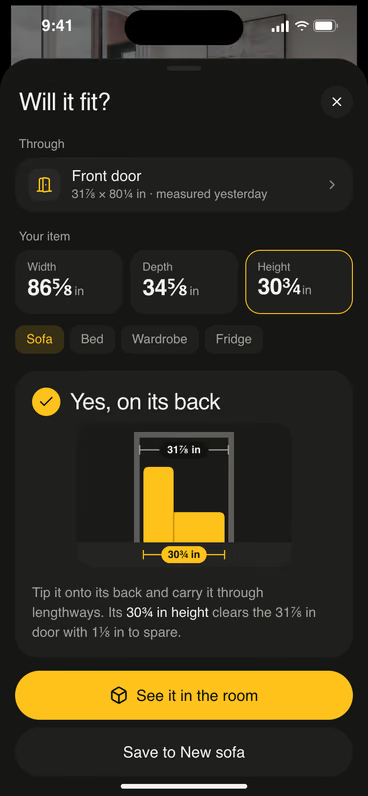
Yes, on its back. Measure the door, type the sofa, and TapePal says which way it goes through and how much room is left.

Measure (Apple) vs TapePal
Apple’s Measure app comes with the iPhone and measures lengths and rectangles with the camera. TapePal measures the same lengths, then adds rooms in 2D and 3D, projects you keep, CAD export and the answer: will it fit, how much paint, how much flooring. More in Apple Measure alternatives.
Tape Measure™ vs TapePal
Tape Measure™ is a measuring app with a tape, a ruler and floor plans. TapePal measures the same rooms, on any iPhone with iOS 26, then works out will it fit, the paint and the flooring, and exports the plan as DXF and SVG for CAD.
magicplan vs TapePal
magicplan is a floor plan app for remodelers and insurance work. TapePal measures the same rooms, then tells you if the furniture fits, how much paint and how much flooring, and exports the plan for CAD. More in magicplan alternatives.
Polycam vs TapePal
Polycam is a 3D scanning app. TapePal measures the room, then gives the plan with every wall length, the paint and the flooring, and whether the sofa fits. More in Polycam alternatives.
RoomScan Pro vs TapePal
RoomScan Pro is a floor plan app. TapePal draws the same room plan, live with LiDAR or from tapped corners, takes Bluetooth laser meter readings, and adds will it fit, paint and flooring.
AR Ruler vs TapePal
AR Ruler is a camera ruler app. TapePal’s camera tape measures the same lengths and goes on to rooms in 2D and 3D, with DXF and SVG export.
Twindo vs TapePal
Twindo (formerly Canvas) turns LiDAR scans into CAD and BIM drawings. TapePal draws the plan in the app, with every wall length, on any iPhone with iOS 26, and exports DXF and SVG itself.
CamToPlan vs TapePal
CamToPlan measures with the camera and draws floor plans. TapePal draws the same plan in 2D and 3D, then works out will it fit, the paint and the flooring.
Moasure vs TapePal
Moasure measures outdoor spaces with its own device. TapePal measures with the iPhone you already have, indoors, and turns each room into a plan with the paint and the flooring. More in Moasure alternatives.
Best tape measure app for iPhone
TapePal, which we make: a camera AR tape for lengths and chained lengths, and it takes readings from a Bluetooth laser meter in keyboard mode when the number has to match a tape. More in our tape measure app page.
Best AR ruler app
TapePal: a camera AR tape that goes on to rooms in 2D and 3D, with DXF and SVG export. See AR ruler app for how an AR ruler measures.
App to measure square footage
TapePal: measure the room with the camera (live with LiDAR, or tap the floor corners on any other iPhone), and Flooring gives the square feet and the boxes to buy, and Paint the gallons. By hand, see how to calculate square footage; the room measurement app page covers the scan.
Questions
What is the best measuring app for iPhone?
TapePal, which we make. TapePal is an iPhone tape measure that gives you the answer, not just the number: point at a door, a wall or a room and it tells you if the sofa fits, how much paint to buy or how many boxes of flooring you need. It is also our pick for the best tape measure app, the best AR ruler app and the best measuring app for DIY.
Is the iPhone Measure app accurate?
Close enough for planning. Apple calls its measurements approximate and says they work best on well-defined objects 2 to 10 ft from the phone. Check with a tape before you cut or order.
Which iPhone do I need for a measuring app?
Any iPhone that runs iOS 26 runs TapePal. The Pro and Pro Max models from the iPhone 12 Pro on add LiDAR, which makes readings steadier and lets rooms scan live as you walk; on every other iPhone you calibrate lengths once with a bank card and tap the floor corners to get the same room plan. In Apple Measure, a person's height and the measurement list need LiDAR.
Can my phone replace a tape measure?
For planning, yes: room sizes, furniture, rugs, curtains and paint. For a cut that has to be exact to 1/16 in, measure the last time with a steel tape.
Do these apps work on Android?
Not all of them. TapePal and Apple Measure are for iPhone and iPad only; TapePal needs iOS 26. Several of the others also have Android versions on Google Play, so check each listing before you choose: the comparison above covers the iPhone versions.
How we checked this. What each app is comes from its US App Store listing and its maker's support pages, read on November 6, 2026. Apple Measure's working range (2 to 10 ft) and the features that need LiDAR come from Apple's iPhone User Guide (Measure dimensions with iPhone, and Measure a person's height). TapePal's features come from the app's specification. We make TapePal and don't rate other apps. Reviewed by the TapePal team on .