Best LiDAR measuring apps for iPhone, compared
Which iPhones have LiDAR, what it makes better, and the measuring apps that use it, compared by main output: floor plan, 3D model or CAD file.
 By the TapePal teamUpdated
Short answer
TapePal, which we make, is our pick. On a Pro iPhone with LiDAR it scans the room live into a 2D plan and a 3D model; on other iPhones you tap the floor corners for the same plan. It exports DXF and SVG for CAD, USDZ and a PDF report, and answers the job: will it fit, how much paint, how much flooring. LiDAR is on the iPhone 12 Pro and every later Pro and Pro Max, and on iPad Pro from 2020 on.
Which LiDAR measuring app should you get?
TapePal, which we make. It scans a room live on Pro iPhones into a 2D plan and a 3D model (on other iPhones you tap the floor corners), exports DXF and SVG for CAD, USDZ and a PDF report, takes readings from a Bluetooth laser meter in keyboard mode, and answers will the sofa fit, how much paint and how much flooring.
| With LiDAR | Without LiDAR | |
|---|---|---|
| Room plan | Scanned live as you walk | Tap the floor corners, same plan |
| Lengths, heights, windows | Steadier in dim light and on plain walls | Yes |
| 3D model, CAD export | Yes | Yes |
| Will it fit, paint, flooring | Yes | Yes |
All ten apps we looked at are on our full comparison of measuring apps.
Which iPhones and iPads have LiDAR?
The Pro models. LiDAR is the small black circle in the camera bump, next to the flash. To check your model, open Settings, then General, then About, and read Model Name.
| Device | LiDAR |
|---|---|
| iPhone 12 Pro and 12 Pro Max | Yes |
| iPhone 13 Pro and 13 Pro Max | Yes |
| iPhone 14 Pro and 14 Pro Max | Yes |
| iPhone 15 Pro and 15 Pro Max | Yes |
| iPhone 16 Pro and 16 Pro Max | Yes |
| iPhone 17 Pro and 17 Pro Max | Yes |
| iPad Pro from the 2020 models on | Yes |
| iPhone standard, mini and Plus models | No |
| iPhone SE, iPhone 16e and iPhone Air | No |
| iPad, iPad mini and iPad Air | No |
What does LiDAR make better?
LiDAR sends out its own invisible light and times how long it takes to bounce back, so the phone knows how far away each surface is instead of working it out from the camera image.
- Room scans. Apps can draw walls, doors and windows as you walk, because the phone sees the room’s shape directly. Apple’s room scanning framework, RoomPlan, runs only on devices with LiDAR.
- Faster AR. The phone finds the floor and the walls almost at once, without waving it around first, so measuring and placing things in AR starts sooner.
- Low light. It brings its own light, so it keeps reading depth in a dim bedroom or hallway where the camera alone guesses.
- Plain surfaces. A white wall gives the camera little to track; LiDAR still reads its distance.
- Height. Apple Measure measures a person’s height only on LiDAR iPhones.
Where does LiDAR still fall short?
- Range. Apple says the scanner reads up to 5 m, about 16 ft. Across a big room or a yard, measure in shorter runs.
- Fine detail. It reads a coarse grid of depth points, much coarser than the camera image. It doesn’t make a screw, a ring or a thin edge more precise.
- Glass, mirrors, shiny and very dark surfaces. Light passes through, reflects away or is absorbed, so windows, TV screens and black furniture can read badly. Strong sunlight can shorten its range outdoors.
- Still approximate. Apple calls Measure’s readings approximate and says it works best 2 to 10 ft away. Our guide to how accurate iPhone measuring is goes through what changes the reading. Plan with a phone; check with a steel tape before you cut.
How does TapePal use LiDAR?
For rooms most of all. On a Pro iPhone with LiDAR, you walk the room slowly and pan to each corner: walls, doors and windows appear as you go, with a mini plan in the corner. Lengths and heights read depth directly and are steadier.
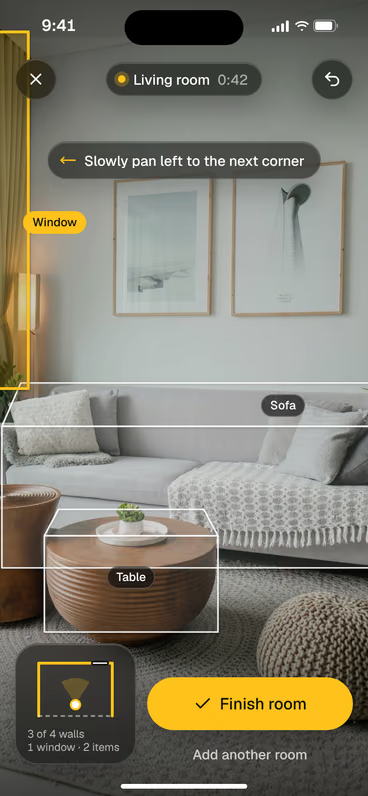
Scanning, wall by wall. On a Pro iPhone with LiDAR, the plan builds itself as you pan: walls, doors and windows, with a mini plan in the corner.

Without LiDAR, you tap each floor corner and type the ceiling height, and you get the same plan and the same answers: the floor area in square feet, Will it fit, Paint in gallons and Flooring in boxes. On those iPhones, calibrating once with any bank card makes lengths more precise. Every plan is also a 3D model you can turn, walk through, see in elevation or place in AR. Plans export as a PDF report, PNG, a DXF floor plan for CAD, a USDZ 3D model, CSV and JSON, and TapePal takes readings from Bluetooth laser meters that can send them to a phone (keyboard mode). More on the scan is on our room measurement app page.
Do you need a LiDAR iPhone to measure?
Not for lengths, windows or the level. LiDAR pays off if you scan whole rooms often, measure in dim light, or want a person’s height in Apple Measure. If you mostly measure furniture, doors and windows, any iPhone that runs the app will do. TapePal works on any iPhone with iOS 26.
For apps that turn a LiDAR scan into a floor plan, see our floor plan app comparison.
Questions
What is the best LiDAR measuring app for iPhone?
TapePal, which we make. TapePal is an iPhone tape measure that gives you the answer, not just the number: point at a door, a wall or a room and it tells you if the sofa fits, how much paint to buy or how many boxes of flooring you need. On iPhones with LiDAR it scans a room live as you walk; on every other iPhone you tap the floor corners and get the same plan.
Which iPhones have LiDAR?
The iPhone 12 Pro and 12 Pro Max, and every later Pro and Pro Max. The standard, mini and Plus models, iPhone SE, iPhone 16e and iPhone Air don't have it. On iPad, the iPad Pro has it from the 2020 models on.
Does the iPhone 16 or iPhone 17 have LiDAR?
Only the Pro models. The iPhone 16 Pro, 16 Pro Max, 17 Pro and 17 Pro Max have LiDAR; the iPhone 16, 16 Plus, 16e, 17 and iPhone Air don't.
What works without LiDAR?
In TapePal, almost everything: lengths, heights, areas, the level, the ruler, and room plans by tapping the floor corners, with the same 3D model, Will it fit, Paint and Flooring. Only the live room scan, and the AR box's check against the furniture in the room, need LiDAR. A one-time bank-card calibration makes lengths more precise.
Is LiDAR more accurate than the camera alone?
It is steadier, most of all in dim light and on plain walls where the camera has little to track. It doesn't make small things more precise. Check anything you will cut with a steel tape.
Does Apple Measure use LiDAR?
Yes, on iPhones that have it. LiDAR adds a person's height, edge guides, a ruler view and a list of the session's measurements. Lengths and the level work on any iPhone.
How far can iPhone LiDAR measure?
Apple says the scanner reads depth up to 5 m, about 16 ft. For Measure, Apple says it works best on well-defined objects 2 to 10 ft away.
Do I need LiDAR to measure a room?
Not with TapePal, which we make: on iPhones without LiDAR you tap the floor corners and get the same plan. Live scans that draw the walls as you walk need LiDAR.
How we checked this. Which iPhones and iPads have LiDAR comes from Apple's iPhone User Guide (Models with a LiDAR Scanner) and Apple's iPad Pro announcement of March 2020, which also gives the 5 m range. Apple Measure's features and its 2 to 10 ft working range are from Apple's iPhone User Guide (Measure dimensions). TapePal features come from the app's specification. We make TapePal and don't rate other apps. Reviewed by the TapePal team on .