Room measurement and square footage app for iPhone
Measure room dimensions and square footage with your iPhone: scan or tap out the room, get the floor plan, then the paint and flooring. With or without LiDAR.
 By the TapePal teamUpdated
Short answer
TapePal measures a room with your iPhone camera and draws the floor plan: every wall's length, floor area in square feet, perimeter and wall area. Then it works out the paint and flooring to buy. Pro iPhones with LiDAR scan the room live; on other iPhones you tap the floor corners and get the same plan.
How do you measure a room with your iPhone?
- Scan the room Walk the room slowly and pan to each corner. On a Pro iPhone with LiDAR, walls, doors and windows appear as you go; on other iPhones, tap each corner where wall meets floor, then confirm the ceiling height.
- Check the plan Tap a wall to type its exact length, add a door or a window, or split a wall. Add the next room and the plan grows into the whole home.
- Get the answers Open Paint or Flooring for that room, or export the plan as a PDF, a DXF for CAD or a 3D model.
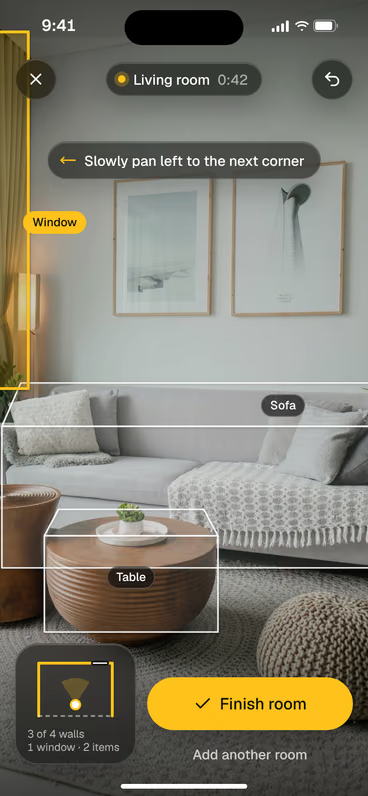
Scanning, wall by wall. On a Pro iPhone with LiDAR, the plan builds itself as you pan: walls, doors and windows, with a mini plan in the corner.

What do you get from one room?
Everything the next job needs, worked out from the plan. Our demo living room:
| Number | Living room | How it is worked out |
|---|---|---|
| Size | 17′ 1″ × 15′ 6″ | From the plan |
| Floor area | 265 sq ft | The area inside the walls |
| Perimeter | 65′ 3″ | All the walls added up |
| Wall area | 578 sq ft | Perimeter × ceiling height |
| Paint | 2.5 gal, 3 one-gallon cans | 494 sq ft after doors and windows, 2 coats |
| Flooring | 13 boxes of 22.6 sq ft | 292 sq ft with 10% extra for cuts |
| Baseboard | 65′ 3″ | All the walls, in 8 lengths |
Can an app measure square footage?
Yes. TapePal is a square footage app that measures the room for you: scan it or tap out the floor corners, and the plan shows the floor area in square feet with every wall’s length beside it. The area comes from the plan itself, so an L-shaped room needs no splitting into rectangles. The 3D model comes with it: top view, dollhouse, walk-through, elevations and View in AR.
Already have the lengths? Our free square footage calculator adds up any room shape in your browser. To draw the whole home, see our floor plan app page, or our floor plan generator page for how a scanned plan differs from an AI one.
What is the best room scanner app?
TapePal. A room scan in TapePal gives you more than a 3D capture: you get a 2D floor plan with every wall’s length, a 3D model you can view from the top, as a dollhouse, as a walk-through or wall by wall in elevation, and the paint and flooring for that room. On a Pro iPhone with LiDAR the room scanner runs live, finding the walls, doors and windows as you pan; on any other iPhone you tap the floor corners and get the same plan and the same 3D room. Export it as a PDF, a DXF or SVG for CAD, or a USDZ 3D model. How it compares with magicplan, Polycam and RoomScan is on our best measuring apps page.
Does it need LiDAR?
No, but LiDAR makes it quicker. iPhone 12 Pro and the later Pro models have LiDAR and scan the room live. On every other iPhone that runs iOS 26, you tap the floor corners and type the ceiling height, and you get the same plan and the same answers. Which iPhones have LiDAR, and how other apps use it, is on our LiDAR measuring apps page; the live scan runs on Apple RoomPlan.
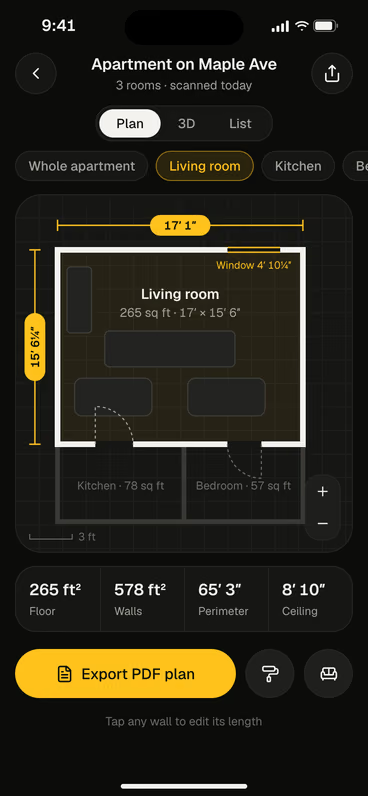
The plan, ready to edit. Type a wall's exact length and the plan follows. Add doors and windows, then open Paint or Flooring.
Questions
Can I measure square footage with my phone?
Yes. Scan or tap out the room and TapePal shows the floor area in square feet. For a rough number without the app, multiply length by width in our free square footage calculator.
Is there an app to measure room dimensions?
Yes: TapePal, which we make. TapePal is an iPhone tape measure that gives you the answer, not just the number: point at a door, a wall or a room and it tells you if the sofa fits, how much paint to buy or how many boxes of flooring you need. It puts each wall's length on the floor plan, in feet and inches. Tap a wall to type an exact length you checked with a tape, or send it from a Bluetooth laser meter in keyboard mode.
Can I export the floor plan to CAD?
Yes: a DXF file (AutoCAD R2000, in feet and inches, or millimeters if you measure in metric) with walls, doors, windows and dimensions on their own layers. PDF, PNG, SVG, USDZ, CSV and JSON exports are there too.
What can I measure a room for: a rug, furniture or a remodel?
All three, from one scan. For a rug, the plan gives the room's size wall to wall, and our rug size guide has the rug that suits it. For furniture, drop a sofa, bed or table into the plan at true size and TapePal warns if it overlaps a wall, then Will it fit checks the doors on the way in. For a remodel, you get the paint, the flooring and the baseboard, and a DXF for CAD or a PDF report for the contractor.
How accurate is a room scan?
Close enough to plan furniture, paint and flooring. Before you cut flooring or order a fitted part, check the key length with a tape.
Which iPhone do I need to measure a room?
Any iPhone with iOS 26: iPhone 11 or later, or iPhone SE (2nd generation) or later. Pro models from the iPhone 12 Pro on have LiDAR and scan the room live as you pan; on every other iPhone you tap the floor corners and get the same plan. TapePal is for iPhone and iPad only, with no Android version.
How we checked this. Features and formulas come from the TapePal app's specification. The example is the app's demo living room. Reviewed by the TapePal team on .