Apple RoomPlan: what it is, which apps use it
Apple RoomPlan turns a LiDAR scan into a 3D plan of a room. Which iPhones run it, what it finds, where it struggles, and the apps built on it.
 By the TapePal teamUpdated 6 min read
Short answer
RoomPlan is Apple's framework for scanning a room with an iPhone or iPad that has a LiDAR scanner, on iOS 16 or later. Apps use it to turn a short walk around a room into a 3D model with its walls, doors, windows, openings and furniture, each with its size. It isn't an app you open: you use it through apps like TapePal, Polycam or the 3D Scanner App.
What is Apple RoomPlan?
A Swift framework that Apple added in iOS 16, in 2022. Built on ARKit, it uses the camera and the LiDAR scanner to build a 3D model of a room while you walk around it, with the type and size of everything it recognizes. The result is a USD or USDZ file that apps can show, measure and convert. Apple pitches it at real estate, shopping, design and architecture apps; see Apple’s Introducing RoomPlan page and the RoomPlan documentation.
Every RoomPlan app shares the same scanning engine, so they find the same walls. They differ in what they do with the scan: a 3D file, a floor plan, a report or an answer.
Which iPhones and iPads support RoomPlan?
Only the ones with a LiDAR scanner, running iOS or iPadOS 16 or later.
| Device | RoomPlan |
|---|---|
| iPhone 12 Pro and 12 Pro Max | Yes |
| Every Pro and Pro Max from iPhone 13 Pro to iPhone 17 Pro | Yes |
| iPad Pro, 2020 and later | Yes |
| iPhone standard, mini, Plus, SE, 16e and Air | No: no LiDAR |
| iPad, iPad mini and iPad Air | No: no LiDAR |
Not sure which iPhone you have? Open Settings, then General, then About. Our page on LiDAR measuring apps covers what LiDAR does and where it falls short.
What does RoomPlan find in a room?
The structure, the furniture and, since iOS 17, the kind of room.
- Surfaces: walls, doors, windows and openings, each with its width and height. Since iOS 17 it handles slanted and curved walls too.
- Objects: storage, refrigerator, stove, oven, dishwasher, sink, washer and dryer, toilet, bathtub, bed, table, sofa, chair, fireplace, television and stairs. Each one is a box with its width, depth and height, not a detailed 3D shape.
- Room type: living room, bedroom, bathroom, kitchen or dining room (iOS 17 and later).
- Several rooms: since iOS 17, apps can join separate room scans into one model of the home.
What are RoomPlan’s limits?
Apple’s own guidance, from its WWDC22 and WWDC23 sessions:
| Limit | Apple's guidance |
|---|---|
| Room size | Works best for one residential room up to 30 × 30 ft |
| Light | 50 lux or more, about a family room at night |
| Scan length | Avoid single scans longer than 5 minutes: heat and battery |
| Whole home | Best in single-floor homes up to about 2,000 sq ft in all |
| Hard surfaces | Full-height mirrors, glass and very dark surfaces |
| Ceilings | Very high ceilings can be past the LiDAR's range |
It is made for rooms indoors, not yards or building sites. And because it needs LiDAR, most iPhones can’t run it at all.
Which apps use RoomPlan?
TapePal, which we make: a RoomPlan scan becomes a 2D floor plan with every wall measured, a 3D model, and the paint, flooring and will-it-fit answers. On iPhones without LiDAR, you tap the floor corners and get the same plan.
How does TapePal use RoomPlan?
On an iPhone or iPad with LiDAR, TapePal runs a RoomPlan scan, then builds its own plan from it:
- Light the room Turn the lights on and open the curtains. Apple recommends at least 50 lux, about a living room at night with the lamps on.
- Start the scan Open the room scan in the app and point the phone at a wall from about the middle of the room.
- Walk the walls slowly Pan along each wall and into each corner, with the floor and the ceiling line in view. Walls, doors and windows appear as they are found.
- Finish in a few minutes Stop when every wall is found. Apple advises against single scans longer than 5 minutes, which heat the phone and drain the battery.
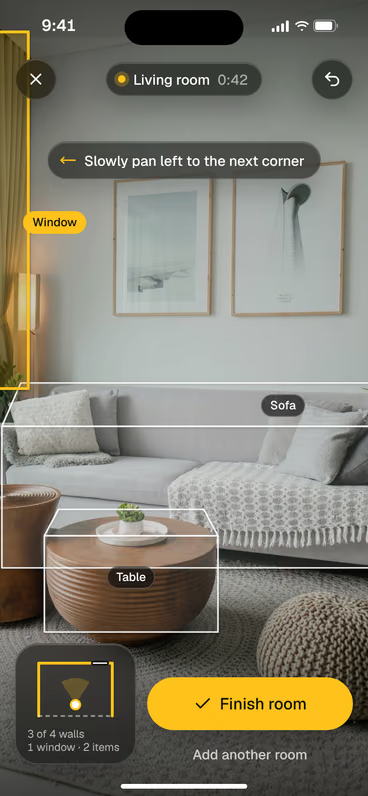
Scanning, wall by wall. On a Pro iPhone with LiDAR, walls, doors and windows appear as you pan, with a mini plan in the corner.

After the scan, TapePal straightens and squares the walls, places the doors and windows, and adds up the furniture and the totals. The plan keeps building if you leave the app, and a notification says when it’s ready. It warns you when a room is too big for one scan, too dark, or when the phone is too warm.
The finished plan shows each room’s floor area, wall area, paintable wall area and ceiling height, with every wall’s length. You can edit it, add the next room or floor, see it in 3D as a dollhouse, a walk-through or wall by wall, and export it as a PDF, PNG, DXF, SVG, USDZ, CSV or JSON. How to read those labels is in our guide to reading a floor plan.
What if your iPhone has no LiDAR?
RoomPlan won’t run, but TapePal still makes the plan. Stand in the room, tap each corner where a wall meets the floor, close the shape and type the ceiling height. You get the same floor plan, 3D model and answers; doors and windows go in by hand in the plan editor, since nothing finds them automatically in this mode. Our floor plan generator page compares the ways to make a plan.
How TapePal compares with the other floor plan apps for iPhone is on our floor plan app page.
Questions
Is RoomPlan an app?
No. It's a framework inside iOS and iPadOS that apps build on. You use it through an app such as TapePal, which we make.
Does RoomPlan work on an iPhone without LiDAR?
No. Apple supports it only on iPhones and iPads with a LiDAR scanner: the iPhone 12 Pro and later Pro and Pro Max models, and iPad Pro from 2020 on. TapePal works around this on other iPhones: you tap the floor corners instead, and get the same floor plan.
Can RoomPlan scan a whole house?
Since iOS 17, apps can join several room scans into one model. Apple says this works best in single-floor homes up to about 2,000 sq ft. TapePal joins rooms and floors itself, and you can drag a room to fix where it sits.
What file does RoomPlan make?
A USD or USDZ 3D model, with the size of each wall, door, window and piece of furniture. Apps can turn that into other files: TapePal exports a PDF report, PNG, DXF, SVG, USDZ, CSV and JSON.
How accurate is RoomPlan?
Close enough to plan furniture, paint and flooring, in good light and a normal-sized room. Glass, mirrors, very dark surfaces and high ceilings make it less sure. For a wall you'll order or cut to, check it with a tape and type the length in.
Does RoomPlan work on Android?
No. RoomPlan is Apple's, for iPhone and iPad only.
How we checked this. From Apple's developer documentation, read on November 10, 2026: the RoomPlan framework reference (iOS and iPadOS 16.0 and later), the Introducing RoomPlan overview, and the WWDC22 session Create parametric 3D room scans with RoomPlan and WWDC23 session Explore enhancements to RoomPlan, which give the room size, lighting, 5-minute and 2,000 sq ft figures. Polycam and 3D Scanner App details are from their US App Store listings the same day. TapePal details come from the app's specification. We make TapePal. Reviewed by the TapePal team on .