Digital tape measure: tape, laser or iPhone app?
Digital tape measures compared: a steel tape with a screen, a laser measure or a phone app like TapePal. What each does best and when to use which.
 By the TapePal teamUpdated
Short answer
A digital tape measure shows the length as a number instead of making you read the marks. It comes in three kinds: a steel tape with a screen that saves each reading (such as the Reekon T1 Tomahawk), a laser measure that reads the distance to a wall, and a phone app. TapePal, which we make, is our pick among apps: it measures with the iPhone camera in feet and inches to 1/16 in, keeps every reading with its photo and turns rooms into floor plans. For a cut, a tape on the work is still the most exact.
What are the kinds of digital tape measure?
Three tools sell under the same name. They read the length in different ways:
| Kind | How it reads | Best for | Watch out for |
|---|---|---|---|
| Digital steel tape | Counts the blade as it comes out and shows the length on a screen | Cut lists for trim, lumber and cabinets | Needs charging; only as long as its blade |
| Laser measure | Times a laser dot to the far wall | Room sizes and long walls, alone | Needs a solid target; hard to see the dot in bright sun |
| Phone app (TapePal) | Reads the length from the camera, and depth on LiDAR iPhones | Planning: rooms, furniture, heights, paint, flooring | Close enough to plan, not to cut |
A digital steel tape like the Reekon T1 Tomahawk is a 25 ft tape with a screen on top. It shows the reading as you pull the blade, saves it with a button, keeps a list of saved readings, and sends them to Reekon’s phone app over Bluetooth. You still hook and pull a blade; the digital part saves you reading the marks and writing them down.
A laser measure is a small box that reads the distance from its back edge to wherever the dot lands. One person can measure a 20 ft room from one wall. How close it gets, and how to hold it, is in our laser measure guide.
A phone app is the one already in your pocket. It measures what the camera sees, saves a photo with every reading, and does things a tape can’t, like drawing a floor plan.
Digital tape measure or app: which should you use?
Pick by the job. Most people end up with a tape for cutting and a phone for everything else:
| Job | Digital steel tape | Laser measure | TapePal on iPhone |
|---|---|---|---|
| Cutting trim, lumber or tile | Yes | Not the usual tool | Plan with it, cut with a tape |
| A wall or a room's length | If it reaches | Yes | Yes, and saved with a photo |
| A person's or a door's height | Awkward | Floor to ceiling, yes | Yes: the floor and the top are found for you |
| A floor plan of the room | Wall by wall, by hand | Wall by wall, by hand | Yes: scan it, or tap the floor corners |
| Paint, flooring, will it fit | No | No | Yes: worked out from what you measured |
| Sharing with a contractor | Through its app | Write it down | PDF report or a photo with the sizes on it |
| Already in your pocket | No | No | Yes |
TapePal: our pick among digital tape measure apps
We make it, so judge it by what it does. Two taps with the camera give a length; keep tapping and it adds up the runs, the way you’d run a tape along a fence or a baseboard.
- Tap the start Point the iPhone camera at one end and tap. The point snaps to the corner or edge it finds.
- Tap the end Move to the other end and tap again. The length shows in feet and inches, to 1/16 in, or in metric.
- Keep tapping, or save Tap on to chain the next length and add up the total. Save it, and the reading is kept with its photo, in its room and project.
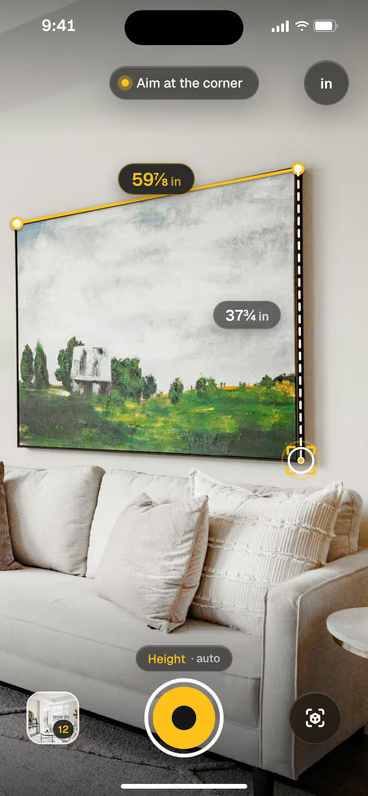
59⅞ in wide. Two taps across a painting: the length sits on the line, in feet, inches and sixteenths.

- The readout: inches with fractions to 1/16, 1/8 or 1/4 in, feet and inches, centimeters or meters. Switching units never loses detail.
- Snapping: points lock onto the corners and edges the camera finds, so the line starts where you mean.
- Heights and windows: point at a person, a door or a window and the app finds the top, the floor or the frame for you.
- Memory: every reading is saved with its photo, sorted by room and project. Drag a point onto the real corner in the photo later, and the length updates.
- Rooms: scan a room on a Pro iPhone with LiDAR, or tap the floor corners on any other iPhone, and get a floor plan with every wall measured. More on our tape measure app page.
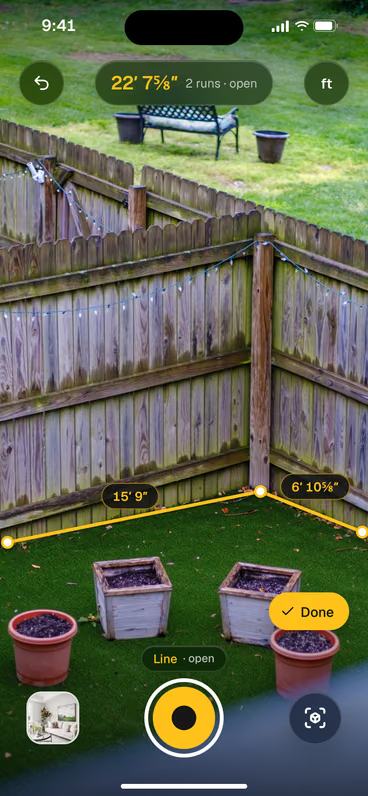
22′ 7⅝″ over 2 runs. Keep tapping to chain lengths along a fence. The total adds up as you go.
To see TapePal next to the other measuring apps for iPhone, read our comparison of the best measuring apps.
How close does each one get?
- Digital steel tape: as close as the blade, read for you. It’s the one to cut with. Check the maker’s stated accuracy, and hook the end tight.
- Laser measure: quick and close over a room, when the dot lands on a flat, solid surface square to the meter. It can’t follow a curve or measure round an object.
- Phone app: close enough to plan. Apple says phone measuring works best 2 to 10 ft away, in good light, on well-defined objects. LiDAR iPhones read depth directly and are steadier; on other iPhones, calibrating TapePal once with any bank card makes lengths more precise. Our guide to how accurate the iPhone Measure app is covers what changes the reading.
Can you use a laser measure with the app?
Yes, for room plans. Bluetooth laser meters that can send their reading (keyboard mode) type it straight into TapePal: pick a wall of a scanned room, press the meter’s button, and the laser’s length replaces the camera’s. In the plan editor, the reading fills the wall you picked. That gives you the camera’s speed for the whole room and a laser’s reading on the walls you’ll order to. See how to use a laser measure for the steps.
Questions
What is a digital tape measure?
A tape measure that shows the reading as a number on a screen. Most are steel tapes with a sensor that counts the blade as it comes out; some save readings and send them to a phone. Laser measures and phone apps are often sold and searched as digital tape measures too.
Are digital tape measures accurate?
A steel digital tape is as close as the blade you hook on the work, which makes it the most exact of the three for short cuts. A laser measure is quick and close over a room's length if it has a flat target. A phone app is close enough to plan furniture, rooms, paint and flooring.
Is there a digital tape measure app?
Yes. TapePal, which we make, is a digital tape measure app for iPhone: it measures lengths and heights with the camera, in feet and inches to 1/16 in, keeps each reading with its photo, and turns rooms into floor plans.
What is a digital meter tape?
Another name for a digital tape measure: a tape, a laser or an app that shows the length on a screen. Most switch between feet and inches and meters; TapePal shows inches, feet and inches, centimeters or meters, one tap apart.
Can my phone replace a digital tape measure?
For planning, yes: room sizes, furniture, rugs, curtains, paint and flooring. For trim, lumber or anything you cut to 1/16 in, hook a tape on the work.
Does TapePal work with a laser measure?
Yes, for room plans. Bluetooth laser meters that can send their reading (keyboard mode) type it into TapePal, wall by wall, in place of the camera's length.
Which phones does the TapePal tape measure work on?
iPhone and iPad with iOS 26 or iPadOS 26: iPhone 11 or later, and iPhone SE (2nd generation) or later. On a Pro iPhone with LiDAR it reads depth directly; on the others you calibrate once with a bank card. There is no Android version.
How we checked this. Reekon T1 Tomahawk details come from Reekon's product listing and published reviews, read on November 10, 2026. TapePal features come from the app's specification; how close a phone gets follows Apple's iPhone User Guide, which says Measure works best 2 to 10 ft away and that its readings are approximate. We make TapePal. Reviewed by the TapePal team on .