Laser measure: how accurate, and how to use one
A laser measure reads the distance to a dot on the far wall, rated ±1/16 in. How it works, how to use one, and how to send its readings to an iPhone.
 By the TapePal teamUpdated 6 min read
Short answer
±1/16 in (about ±1.5 mm): that's how close most home laser measures are rated. A laser measure sends a laser dot to a wall or other target and times the light that comes back, so one person can read the length of a room in a second. Common models reach 100 to 330 ft indoors. For room sizes, ceilings and long walls it's quicker than a tape; for a cut, hook a tape on the work.
What is a laser measure?
A small handheld box that reads the distance from one of its edges to wherever its laser dot lands. It’s also sold as a laser tape measure, a laser distance measurer or a laser distance meter. You hold it against one wall, aim the dot at the other, press a button and read the length on the screen, in feet and inches or in meters.
| Mode | What it gives you | Use it for |
|---|---|---|
| Distance | One length, from the reference edge to the dot | Room sizes, ceiling heights, long walls |
| Area | Two lengths multiplied | Square footage of a room or a wall |
| Volume | Three lengths multiplied | Cubic feet of a room or a storage unit |
| Add and subtract | Lengths added together or taken away | A wall with a jog, the space left after a cabinet |
| Continuous (tracking) | A live reading as you move, often with the min and max | Finding a set distance, the longest diagonal |
| Indirect height (Pythagoras) | A height worked out from two or three readings | Walls and ceilings where the dot can't reach the top |
| Bluetooth | Each reading sent to a phone app | Floor plans and notes, without writing numbers down |
It isn’t a laser level. A laser level projects a level or plumb line across a room so you can mark it; a laser measure only reads distance. Some tools do both, and some laser measures have a tilt sensor that reads angles too.
How does a laser measure work?
It sends out short pulses of laser light, or a beam whose brightness is modulated, and catches what bounces back from the dot. The time the light takes, or how far its wave has shifted when it comes back, gives the distance. Light is fast, so the electronics work in fractions of a billionth of a second, which is why a laser measure needs a target that sends enough light back.
That’s also why the target matters more than the tool:
- Light, flat and square is best: a painted wall, a door, a sheet of card held straight on.
- Dark, shiny or rough surfaces send back less light: the reading takes longer, fails, or comes back less exact.
- Glass and mirrors let the dot through or send it elsewhere. Tape paper on them.
- Bright sun drowns the dot. Use a target plate, work in shade, or use a model with a camera viewfinder.
How accurate is a laser measure?
Most home and trade laser measures are rated ±1/16 in, about ±1.5 mm. That’s the maker’s figure for a good target at short and medium range. ISO 16331-1 sets out how makers test it, so check that a spec sheet quotes the standard when you compare models.
What the rating doesn’t cover is how you hold it:
- The wrong reference edge. A laser set to measure from its front edge, with its back edge on the wall, reads short by the laser’s own length. That’s 4 or 5 inches on most models.
- Aiming up or down. A dot that lands higher or lower than straight across reads long. Over a 12 ft room, a dot 1 ft high on the far wall adds about 1/2 in.
- Not square to the wall. Measure from a corner or a door frame that’s out of square and the length is for that line, not the room.
Held right, a laser measure is as close as a tape over a room’s length, and closer than one over 30 ft or more, where a tape sags and bends. For a cut, a tape hooked on the work is still the tool to trust.
How do you use a laser measure?
Three steps, the same on every model:
- Set the reference edge Check which edge the laser measures from: the back edge is the default on most models. Press the back edge flat against the wall, floor or corner you measure from.
- Aim at a flat target Point the dot at a flat, light-colored spot on the far surface, square to the laser. Keep the laser level so the dot lands straight across from you, not up or down the wall.
- Measure and read Press the measure button once to switch the laser on and again to read. Write the number down or save it, then measure the other way and multiply the two for the area.
Measure a room
Stand with the laser’s back edge flat on one wall, about chest height, and read the distance to the opposite wall. Turn 90° and read the other way. Measure each wall at two heights: walls and baseboards are rarely perfectly straight. Multiply length by width for the square footage; how to calculate square footage covers L-shaped rooms and closets.
Measure a ceiling height
Set the laser on the floor, back edge down, and aim straight up. Most lasers read to the ceiling in one press. For a vaulted or very high ceiling, use the indirect height mode: the laser reads two or three distances and works out the height with Pythagoras.
Measure for flooring
Measure each room wall to wall, in both directions, before the baseboards come off. Add the closets and doorways. How to measure a room for flooring shows how much extra to buy for waste and pattern.
Laser measure or tape measure?
Use both: they’re good at different jobs.
| Laser measure | Tape measure | Phone app | |
|---|---|---|---|
| Best for | Room sizes, ceilings, long walls, alone | Cuts, short lengths, outside corners | Planning: rooms, furniture, paint, flooring |
| Rated accuracy | ±1/16 in on most models | As close as the blade's marks | Approximate: check it against a tape |
| Needs | A target for the dot | A second hand or a hook | Light and a surface the camera can see |
| Keeps the reading | In its memory, or on a phone over Bluetooth | No | Yes, with a photo |
A laser can’t measure a box, a pipe or a board on the bench: there’s nothing for the dot to land on at the end. A tape can’t measure a 20 ft room on your own without sagging. A phone app measures what the camera sees, which is quick for planning, and Apple’s own guide calls its Measure readings approximate. More on that in is the iPhone Measure app accurate? and on our digital tape measure page.
Can you send laser measure readings to your iPhone?
Yes, with a Bluetooth laser measure and an app that takes its readings. TapePal, which we make, works with Bluetooth laser meters that send their reading in keyboard mode: you pair the meter in your iPhone’s Bluetooth settings like a keyboard, and each reading types itself into TapePal.
Here’s how it works in a room:
- Scan or trace the room. Pro iPhones with LiDAR scan it live; every other iPhone taps the floor corners and gets the same 2D floor plan, with every wall measured, and a 3D model.
- Pick a wall and press measure on the laser. The reading goes on that wall in place of the camera’s length. Do the next wall, and the next.
- Save and export. The plan keeps the laser lengths. Export it as a PDF, a PNG, or DXF and SVG floor plans for CAD.
You can also fill a wall in the plan editor: select it, measure with the laser, and the length lands there. Check that your meter has a keyboard mode (sometimes called HID mode) in its manual before you rely on it. More on rooms on our room measurement app and floor plan app pages.
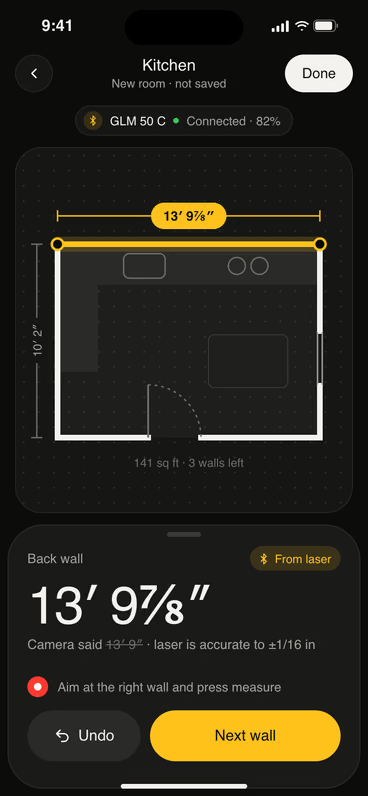
Laser lengths on every wall. Pair a Bluetooth laser meter that sends its reading, pick a wall in TapePal and press measure. The length lands on the plan.

Is your iPhone a laser measure?
Not quite. Pro iPhones have a LiDAR scanner, a laser depth sensor that maps the room for AR and room scans, but it isn’t a laser distance meter with a dot and a button. Any iPhone can still measure with the camera: TapePal’s AR tape reads lengths, chained lengths, areas and heights, and turns rooms into floor plans. When a wall has to be exact, measure it with a laser and send the reading in.
Questions
How accurate is a laser measure?
Most home and trade laser measures are rated ±1/16 in, about ±1.5 mm, at short and medium range with a good target. The error grows over long distances, in bright sun and on dark, shiny or angled surfaces.
Can a laser measure work outside?
Yes, but the dot is hard to see in daylight. Aim at a solid target in shade, use a target plate, or pick a model with a camera viewfinder. Range outdoors is shorter than the indoor rating.
Is a laser measure safe for your eyes?
Most are Class 2 lasers under 1 mW, the same class as many laser pointers. Your blink reflex protects you from a brief flash, but never stare into the beam or point it at someone's eyes.
Does a laser measure work through glass or on mirrors?
Not reliably. Glass lets the dot pass through or bounce it away, and a mirror sends it somewhere else. Tape a piece of paper or card on the glass and measure to that.
Can I use a laser measure with my iPhone?
Yes, with a Bluetooth laser measure and an app that takes its readings. TapePal, which we make, takes readings from Bluetooth laser meters that send them in keyboard mode, and puts each one on a wall of your floor plan.
How we checked this. Accuracy and range figures are the makers' own spec sheets, read 12 Nov 2026: Bosch lists its GLM 50 C at ±1/16 in and 165 ft, and Leica lists its DISTO D2 at ±1.5 mm and 100 m (330 ft). How handheld laser distance meters are tested is set out in ISO 16331-1. Laser classes follow IEC 60825-1 and the FDA's laser product rules (21 CFR 1040.10). TapePal's laser meter features come from the app's specification. We make TapePal. Reviewed by the TapePal team on .