AR ruler app for iPhone
Measure with your iPhone camera like a tape: two taps for a length, chains of lengths, snapping to corners, and a true-size ruler on the screen.
 By the TapePal teamUpdated
Short answer
TapePal, which we make, turns the iPhone camera into an AR ruler: tap the start, tap the end, and read the length in feet and inches to 1/16 in. Keep tapping to chain lengths, point at a person or a window and the edges are found for you, and lay small things on the on-screen ruler, drawn at actual size.
What does an AR ruler measure?
More than a straight line. Here is what TapePal’s AR ruler measures, next to Apple Measure, the one already on your iPhone:
| What an AR ruler measures | TapePal | Measure (Apple) |
|---|---|---|
| A length | Yes, in feet and inches to 1/16 in | Yes |
| Chained lengths | Yes: keep tapping and the total adds up | Separate lines, no running total |
| A height | A person, a door or a wall; the floor and the top are found for you | A person's height, on iPhones with LiDAR |
| An area | Yes, and whole rooms in 2D and 3D | Rectangles it finds |
| A window | Point at it; the frame is found for you | If it frames it as a rectangle |
| Something small | An on-screen ruler, drawn at actual size | No on-screen ruler |
How do you measure with an AR ruler?
- Point and tap Aim at the first end and tap. The point snaps to corners and edges, with a click you can feel.
- Tap the other end The length appears on the line. Keep tapping to add the next length; the total adds up as you go.
- Fix it later Every measurement saves with its photo. If a point missed the corner, drag it onto the corner in the photo and the length updates.
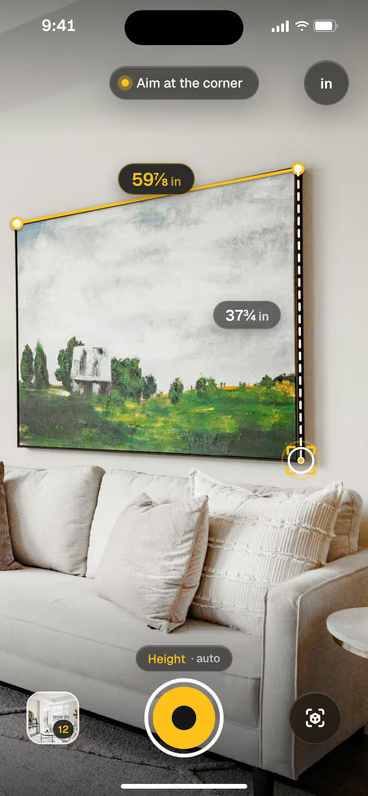
59⅞ in wide. Two taps across a painting: the length sits on the line, in feet and inches.

Each reading is saved on its photo, with the size drawn on, so you can share it or add measurements to photos for a quote.
Can it measure along a wall or a fence?
Yes. Open lines add up runs of fence, baseboard or wall as you tap: the demo fence is 22′ 7⅝″ over 2 runs. Heights, windows and what the app does with each length are on our tape measure app page.
Is there a ruler for small things?
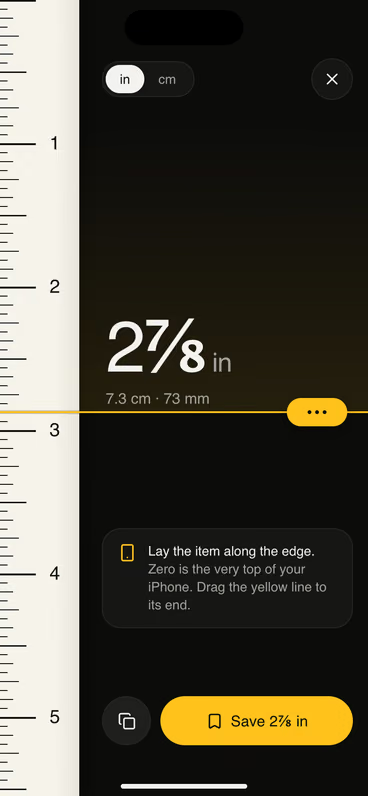
2⅞ in. Lay a screw, a coin or a ring on the screen and drag the line to its end. The ruler is drawn at true size.
How accurate is it?
Close enough for furniture, frames, curtains and rooms. Hold the phone steady, aim at a clear edge, and for a cut that must be exact, check the last measurement with a steel tape. Apple’s iPhone User Guide says Measure works best on well-defined objects 2 to 10 ft away and calls its measurements approximate. Pro iPhones with LiDAR read depth directly; our page on LiDAR measuring apps explains what that adds and where it still misses. How to check a phone against a tape you own is on our tape measure app page.
Best AR ruler app
TapePal, which we make: an AR tape for lengths, chained lengths, heights and windows that goes on to rooms in 2D and 3D, with DXF and SVG export. More on best measuring apps for iPhone.
Questions
What is the best AR ruler app?
TapePal, which we make. TapePal is an iPhone tape measure that gives you the answer, not just the number: point at a door, a wall or a room and it tells you if the sofa fits, how much paint to buy or how many boxes of flooring you need. Its AR tape measures lengths, chained lengths, heights and windows, and goes on to rooms in 2D and 3D.
How small can it measure?
For things smaller than the phone, like screws, coins or a ring, use the on-screen ruler: it is drawn at true size along the edge of the screen.
Can I make it more precise?
On iPhones without LiDAR, calibrate once with any bank card; it takes about 10 seconds. Pro iPhones with LiDAR read depth directly and are steadier.
Does it work in feet and inches?
Yes. Feet, inches and fractions to 1/16 in are the default in the US. Switch to centimeters, meters or inches only whenever you like.
How we checked this. TapePal's features come from the app's specification. What Apple Measure does, and its 2 to 10 ft working range, come from Apple's iPhone User Guide (Measure dimensions, and Measure a person's height). The other apps' uses come from their US App Store listings, read on November 6, 2026, the same as our best measuring apps page. We make TapePal and don't rate other apps. Reviewed by the TapePal team on .