Add measurements to photos with your iPhone
Measure with the iPhone camera and save each size on its photo: lengths, heights and areas drawn on, shared as a picture or a PDF, and fixable later.
 By the TapePal teamUpdated
Short answer
TapePal adds the measurements as you take the photo. Measure with the iPhone camera, press the shutter, and the measurement saves with its photo. Share it as a picture with every size drawn on, or put many in a PDF report. It measures live through the camera; it can't measure a photo already in your camera roll.
How do you add measurements to a photo?
Measure first, then take the photo: TapePal draws the sizes where you measured them.
- Measure with the camera Tap one end, then the other. Keep tapping to chain lengths, frame a rectangle for its width, height and area, or measure a height. Points snap to corners and edges.
- Press the shutter The measurement saves with its photo. Give it a name and a room, and it lands in your library by room and project.
- Share the photo with its sizes Open the measurement and tap Share photo: the photo with every size drawn on, ready for Messages, Mail or Save to Photos.
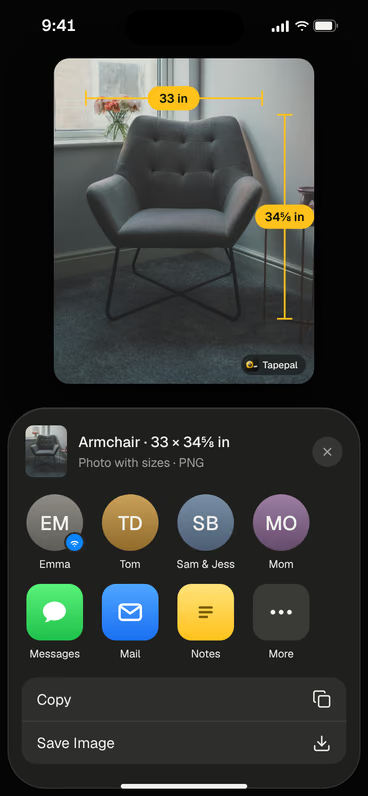
33 in by 34⅝ in, on the photo. The demo armchair, shared from TapePal: its width and height drawn on the photo, ready for Messages, Mail or Save to Photos.

What does the photo show?
The measurement as you took it, drawn in yellow with a label on each side:
- A length or a chain of lengths, with each run labeled.
- A rectangle, like a painting, a window or a rug, with its width and height, or a closed shape with every side and its area in the middle.
- A height, top to bottom.
The shared picture is a 4:5 crop with the TapePal mark in the corner, saved as a PNG. The photo is framed so the whole shape and every label fit, zooming out if it has to.
Can you fix a measurement on the photo later?
Yes. If a point landed beside the corner, open the measurement and drag the point onto the real corner in the photo. TapePal re-measures from what it saved with the photo, and every size on it updates.
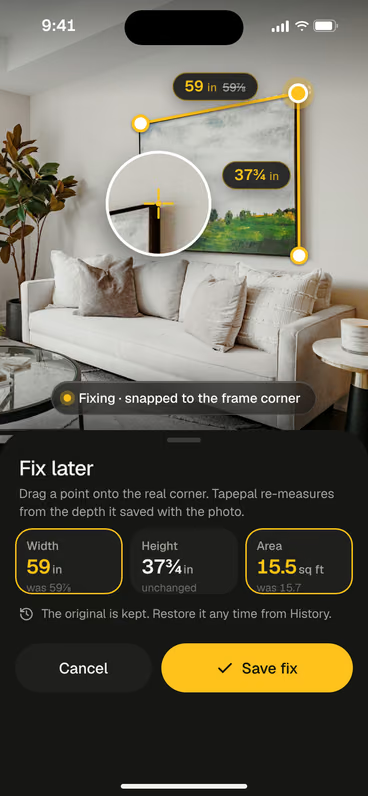
Snapped to the frame corner. Drag a point and a loupe magnifies under your finger; the point catches the photo's corners. Here the painting's width goes from 59⅞ in to 59 in. The original is kept, so you can restore it.
How do you share many measured photos at once?
Export them. A PDF report puts each measurement’s photo in, with its sizes drawn on, beside the room’s plan if you measured one. Turn off Include photos for a shorter report. Measurements without a room plan also export as PNG pictures, one each. Room plans export the same way; the room measurement app page shows what a scan adds.
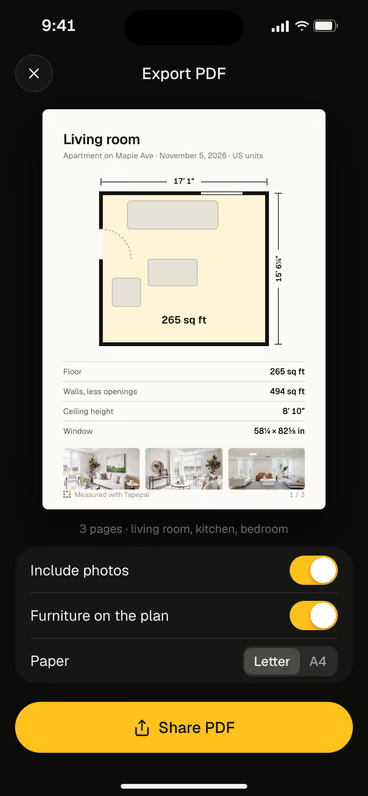
A report, with the photos. The plan, the sizes and the photos from each room, in one PDF to send to a contractor or keep for the store.
Can you measure a photo you already took?
Not in TapePal. A size comes from what the camera knew when you measured: how far away each point was, and where the phone stood. A photo from your camera roll has none of that, so there is nothing to measure it against. Measure the thing again with the camera, and the new photo carries its sizes.
On a room plan, you can pin a photo from your library as a note on the spot it shows. It stays a picture; it isn’t measured.
How accurate are the sizes on the photo?
As accurate as the measurement itself: close enough for furniture, frames, curtains and rooms. Hold the phone steady and aim at a clear edge. On iPhones without LiDAR, calibrate once with a bank card; Pro iPhones with LiDAR read depth directly. For a cut that must be exact, check with a steel tape. The camera itself is covered in our AR ruler app page, the tape measure app page and our guide to measuring with your iPhone.
Questions
Can TapePal measure a photo from my camera roll?
No. It measures live through the camera, where the iPhone knows how far away each point is, and saves that photo with the sizes. A photo taken earlier has no scale for the app to read, so measure the thing again with the camera.
Can I save the photo with the measurements to my Photos app?
Yes. Share photo has Save to Photos, which adds the picture with its sizes drawn on. TapePal asks once for permission to add photos.
What if a point missed the corner?
Open the measurement and drag the point onto the real corner in the photo. A loupe magnifies under your finger, the point catches the corner, and the size updates as you drag. The original is kept, so you can restore it.
Does it show feet and inches on the photo?
Yes. Sizes read in feet and inches to 1/16 in by default in the US, with areas in square feet. You can switch to inches only.
Do I need an iPhone with LiDAR?
No. Any iPhone that runs TapePal measures with the camera. On iPhones without LiDAR, calibrate once with any bank card for more precise lengths; Pro iPhones with LiDAR read depth directly.
Can I send many measured photos at once?
Yes. Export them as a PDF report, with each measurement's photo and its sizes drawn on. Measurements without a room plan also export as PNG pictures, one per measurement.
How we checked this. What TapePal saves, draws and exports comes from the app's specification and its share, Fix later and export screens. The examples are the app's demo armchair and painting. Reviewed by the TapePal team on .