How to measure with your iPhone
How to measure with your iPhone camera: open TapePal, tap each end and read feet, inches and fractions. Plus windows, rooms, height and a ruler.
 By the TapePal teamUpdated 5 min read
Short answer
2 taps: to measure on iPhone, open TapePal, aim the camera's dot at one end of what you're measuring and tap, then aim at the other end and tap. The length shows in feet, inches and fractions and is saved with its photo. For a window, TapePal finds the frame and gives the width and height in one tap.
How do you measure with your iPhone?
Use an app that measures with the iPhone camera and reads like a tape. In TapePal it’s two taps: one at each end. Our tape measure app page shows everything it reads.
- Open TapePal Point the camera at what you want to measure and move the phone slowly so it can see the room.
- Tap the start Line up the dot in the middle of the screen with one end and tap.
- Tap the end Move to the other end and tap again. The length shows on the line, in feet, inches and fractions, and is saved with the photo.
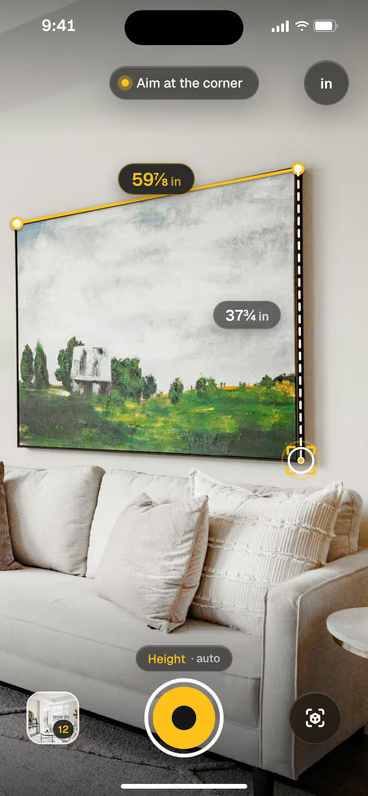
Point, tap, read. Aim at each end and tap. TapePal shows the length in feet, inches and fractions, and saves it with the photo.

What can you measure on iPhone?
Almost anything in a room, from a picture frame to the whole floor plan. Here is what each job looks like in TapePal.
| Job | How | You get |
|---|---|---|
| Length | Tap each end | Feet, inches and fractions to 1/16 in |
| Height | Point at the person, door or wall | Height in feet and inches, floor and top found for you |
| Window | Point at it | Width, height and glass area, found for you |
| Wall or floor area | Tap the corners | Square feet |
| Whole room | Walk it once (LiDAR) or tap the corners | A floor plan with every wall |
| Will it fit | Measure the sofa and the door | Fits upright, on its back or not |
| Paint and flooring | From the room you measured | Gallons, and boxes of flooring |
| Level | Lay it flat or hold it upright | Degrees off level, both ways |
| Small things | On-screen ruler | Actual size, in inches |
How do you measure a room with your iPhone?
Walk it once. On an iPhone with a LiDAR Scanner, TapePal’s room scan draws the floor plan with every wall measured and gives the floor area in square feet. On other iPhones, tap each floor corner and TapePal draws the same plan, or work it out by hand with our square footage guide.
Does the iPhone have a ruler?
TapePal has one: an on-screen ruler at actual size, for screws, rings and anything else small enough to lay on the glass. You set it once so the inches match your screen. More on that on our phone ruler page. In a browser, our free online ruler does the same.
How accurate is measuring with an iPhone?
Close enough to plan with; check with a tape before you cut. Phone measuring works best on clear edges about 2 to 10 ft away, in good light. Shiny, dark or plain surfaces make it harder, and a LiDAR Scanner helps.
Our guide to how accurate phone measuring is goes through each one.
Why not just use the built-in Measure app?
It gives you a length, and that’s where it stops. TapePal is built for the job after it.
| TapePal | Measure app | |
|---|---|---|
| Readings saved with photos | Every reading, automatically | When you tap the shutter |
| Windows found for you | Yes | Rectangles |
| Room scan and floor plan | Yes, in 2D and 3D, on any iPhone | No |
| Export for CAD | DXF, SVG, USDZ, PDF | No |
| Bluetooth laser meters | Yes, in keyboard mode | No |
| Will it fit, Paint, Flooring | Yes | No |
| Level | Yes | Yes |
Questions
How do you measure using the iPhone camera?
Open a measuring app like TapePal and move the phone slowly so the camera can see the floor and walls. Then tap each end of what you're measuring. Nothing to attach: any iPhone with iOS 26 works, and Pro models with LiDAR read steadier.
Do I need an iPhone Pro?
No. A Pro model from the iPhone 12 Pro on scans the room live with its LiDAR Scanner; on other iPhones you tap the floor corners and get the same floor plan. Lengths, windows, areas, the level and the on-screen ruler use the camera and screen.
Can I measure distance with my phone?
Yes, across a room. Phone measuring is most reliable within about 10 ft, so for a long wall or a yard, measure in two or three shorter runs and add them up.
Where are my measurements saved?
In TapePal, each reading is saved with its photo, so you can find the doorway width again when you're in the store.
What about Apple's Measure app?
It comes with iOS and gives you a length. TapePal is built for the job after that: fractions, saved readings, windows found for you, room scans in 2D and 3D with CAD export, and answers like how much paint to buy.
How we checked this. The 2 to 10 ft working range and the list of iPhones with a LiDAR Scanner are from Apple's iPhone User Guide (Measure dimensions; Models with a LiDAR Scanner). TapePal features are from the app. Reviewed by the TapePal team on .