Phone ruler: an actual-size ruler on your iPhone
A phone ruler at actual size: set it once for your iPhone or with a bank card, lay small things on the screen, and use the camera for anything longer.
 By the TapePal teamUpdated
Short answer
For a phone ruler at actual size, open the free online ruler at tapepal.app/tools/online-ruler: it sets itself on most iPhones, or once with a bank card on any phone, and reads to 1/16 in. For anything longer than the screen, TapePal measures with the iPhone camera, in feet and inches.
Is there a ruler on the iPhone?
Not one you can lay things on. Apple’s Measure app measures with the camera: it draws lines, finds rectangles and has a level, and on iPhones with LiDAR (Pro models from the iPhone 12 Pro on) it shows a ruler view along a line you’ve measured. There is no ruler drawn on the screen itself for a screw, a coin or a ring. Our page on Apple Measure alternatives covers what else it leaves out.
So there are two ways to get one: a ruler in the browser, like our free online ruler, or an app with an on-screen ruler, like TapePal.
How do you get a phone ruler at actual size?
- Open the online ruler on your phone Go to tapepal.app/tools/online-ruler. On a phone the ruler runs down the long edge of the screen, in inches with 1/16 in marks.
- Check that it's set The line above the ruler says which iPhone it set itself for. If it doesn't know your screen, tap Use a bank card.
- Match a bank card once Hold any bank card flat in the outline and drag the slider until the edges meet, then tap Save. The setting stays on your phone.
- Measure Put one end of the thing at 0, at the top of the ruler, and drag the yellow line to the other end. Read the length in inches and fractions.
Why it needs setting. A web page draws in CSS pixels, and they aren’t the same size on every phone. An inch is 163 of them on an iPhone 11 and 153 on an iPhone 16. A page that assumes the desktop standard of 96 per inch draws its “inch” at about 5/8 in on an iPhone 16. So the ruler has to know your screen.
On an iPhone it usually does: the online ruler reads the screen size and sets itself from Apple’s specs. Where it can’t, a bank card fixes it. Every credit or debit card is 3.370 in wide (85.60 mm), so matching one to the outline tells the page how big an inch is on your screen. A debit card, a library card or a driver’s license works too.
How accurate is a phone ruler?
Once it’s set, it reads to about 1/16 in, the smallest mark on a US ruler. Without setting it, it can be off by a third or more, so set it before anything that matters.
To check it, lay a US quarter flat on the ruler: it is 0.955 in across, just past 15/16 in. Then, for an exact reading:
- Look straight down. At an angle, the line looks a little off.
- Keep the thing flat. A bolt or a pill should touch the glass along its whole length.
- Leave zoom at 100%. Pinching or zooming the page changes the ruler.
If you’re not sure what the marks mean, how to read a ruler goes through every line, and the inch fractions tool turns a decimal reading into the nearest fraction.
How long is a ruler on an iPhone screen?
As long as the screen, at most. On a phone the online ruler runs down the long edge; Safari’s bars take a little of it, so you get about 5 in on most iPhones. TapePal’s on-screen ruler starts at the very top edge of the iPhone.
| iPhone | Screen length | Decimal | Metric |
|---|---|---|---|
| iPhone 17 Pro Max or 16 Pro Max | 6¼ in | 6.23 in | 158 mm |
| iPhone Air | 5 15/16 in | 5.95 in | 151 mm |
| iPhone 17 Pro, 17 or 16 Pro | 5 11/16 in | 5.70 in | 145 mm |
| iPhone 16 Plus, 15 Plus, 15 Pro Max or 14 Pro Max | 6 1/16 in | 6.08 in | 154 mm |
| iPhone 16, 15, 15 Pro or 14 Pro | 5 9/16 in | 5.56 in | 141 mm |
| iPhone 16e, 14, 13 or 12 | 5½ in | 5.50 in | 140 mm |
| iPhone 14 Plus, 13 Pro Max or 12 Pro Max | 6 1/16 in | 6.07 in | 154 mm |
| iPhone 11 or XR | 5½ in | 5.50 in | 140 mm |
| iPhone SE or 8 | 4 1/16 in | 4.09 in | 104 mm |
The iPhone mini, X, XS and 11 Pro aren’t in the table: their screens share a size in the browser with phones of a different pixel density, so on them the online ruler says it isn’t set to your screen yet. Match a bank card once and it is.
Is there a phone ruler app?
Yes. TapePal, which we make, has an on-screen ruler at actual size. It knows your iPhone model, so there’s nothing to set: lay the thing along the edge with one end at the very top of the iPhone, drag the yellow line to the other end, and read it in inches and fractions to 1/16 in, or in centimeters. Copy the reading or save it to your library.
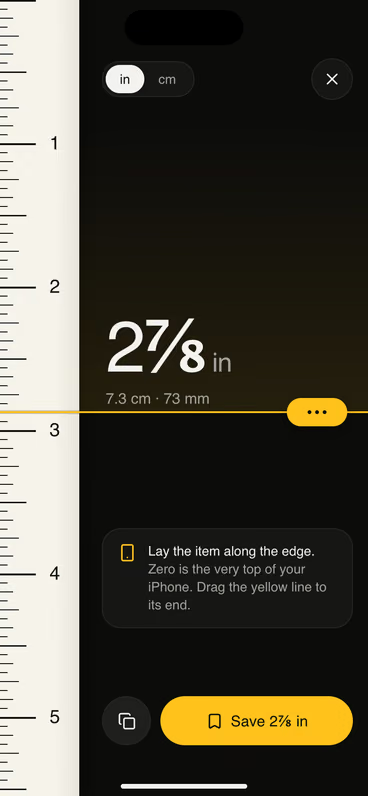
2⅞ in, on the screen. Lay a screw, a coin or a ring on the glass and drag the line to its end. The ruler is drawn at actual size.

How do you measure things longer than the screen?
With a screen ruler, measure to the edge, mark the spot, slide the thing along and add the two readings. That works for a few inches more. For anything over a foot, use the camera.
TapePal’s AR tape measures with the iPhone camera: tap one end, tap the other, and read the length in feet and inches to 1/16 in, with metric one tap away. Keep tapping to chain lengths along a wall or a fence, measure areas, let it find windows for you, or measure a height. On iPhones without LiDAR, calibrate once with a bank card. See the tape measure app and the AR ruler, or how to measure with your iPhone for the basics.
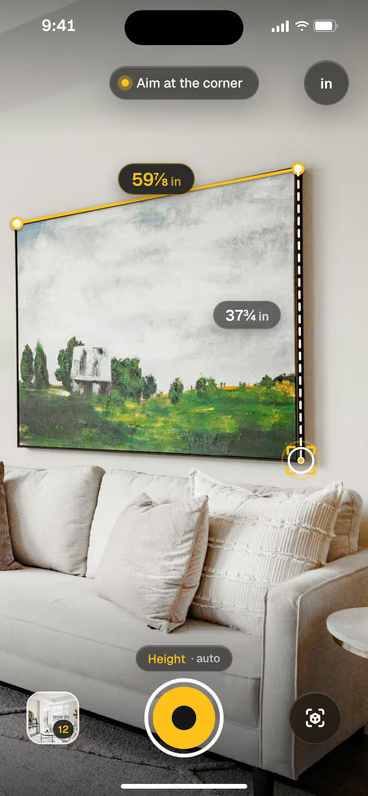
59⅞ in wide. Two taps across a painting: the length sits on the line, in feet and inches.
Questions
Can I use my phone as a ruler?
Yes, for anything shorter than the screen. Open the online ruler, let it set itself for your iPhone or match a bank card once, and lay the thing flat on the glass. For longer things, measure with the camera.
Does the iPhone have a built-in ruler?
No. Apple's Measure app measures with the camera, and on iPhones with LiDAR it adds a ruler view along a measured line, but there is no ruler drawn on the screen to lay small things on.
How long is an iPhone screen?
About 5½ in on an iPhone 16e, 14, 13 or 12, 5 11/16 in on an iPhone 17 or 17 Pro, and 6¼ in on a 17 Pro Max. The table on this page lists every recent model.
Does a phone ruler work on Android?
The online ruler does. It can't tell an Android phone's screen size, so match a bank card to the outline once and it draws at actual size.
Is it accurate enough for a screw or a ring?
Once it's set, yes: it reads to about 1/16 in. Keep the thing flat on the glass and look straight down. For a ring, the ring sizer turns a ring you own into a US size.
How we checked this. Screen lengths are worked out from Apple's published Tech Specs: the pixels along the long side of the display divided by its pixel density, with the display measured as a rectangle. Bank cards follow the ISO/IEC 7810 ID-1 size, 85.60 × 53.98 mm. TapePal's features come from the app's specification. Reviewed by the TapePal team on .