Bubble level app for iPhone
A bubble level app for iPhone: lay it flat on a shelf or hold it upright to a frame, read degrees both ways, set zero and lock. It turns yellow at 0.0°.
 By the TapePal teamUpdated
Short answer
TapePal is a bubble level app for iPhone: lay the phone flat on a shelf or hold its edge to a frame, and read the angle in degrees, left to right and front to back. At 0.0° the screen turns yellow and you feel a click. Set zero on any surface, and lock the reading to read it later.
How do you use your iPhone as a level?
- Lay it down or hold it up Flat or upright is picked for you as you move the phone. You can switch by hand.
- Read the angle A big readout in degrees, with left to right and front to back shown separately.
- Lock or set zero Tap the lock to hold the reading. Set zero on a surface to match another one to it.
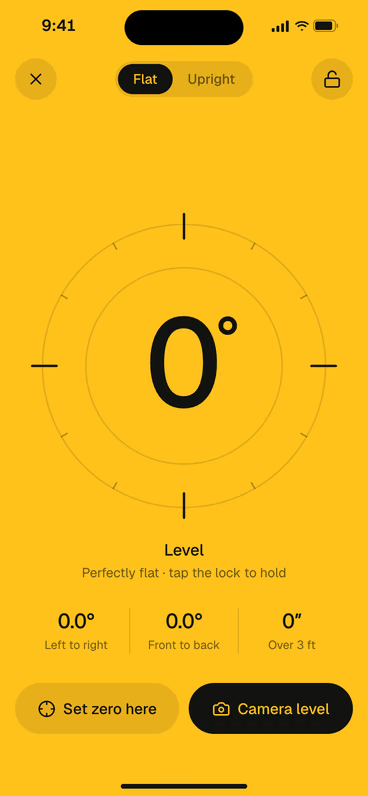
Level. Perfectly flat. The readout turns yellow at 0.0°. Tap the lock to hold it.

Is there a bubble level on iPhone?
Yes. Apple’s Measure app has a simple level. TapePal is the digital spirit level app built for the job: a bubble and a big readout in degrees, left to right and front to back, flat or upright picked as you move the phone, set zero on any surface, and lock. It sits next to the tape measure, so you can level a shelf and measure where it goes without switching apps.
Just need a level online, once? Our free bubble level runs in your phone’s browser. Need the slope as a number, or the rise over 3 ft? See our inclinometer page. How accurate a phone level is, and how to check it, is in our digital level guide.
Why set zero?
To match one surface to another that isn’t level. Set zero on the first shelf, move the phone to the second, and the readout shows how far apart they are.
Angles beyond level: our free protractor reads an angle on the screen, the roof pitch calculator turns rise and run into degrees, and the guides on how to use a protractor and crown molding angles cover the cuts.
What else is in the app?
The same app measures lengths, heights, areas and rooms with the camera, and works out the fit, the paint and the flooring. See how it works.
Questions
How level is level?
The screen turns yellow within 0.1° of level. Over 4 ft, 0.1° is about 1/12 in.
Can I check a picture frame?
Yes. Hold the phone's long edge along the top of the frame, upright, and turn the frame until the screen turns yellow.
Can I use a level on my phone without an app?
Yes. Our free bubble level runs in a phone's browser, with no app to install. The app adds set zero, lock and the tape measure next to it.
How we checked this. Features and the 0.1° threshold come from the TapePal app's specification. 4 ft × tan 0.1° ≈ 0.084 in. Reviewed by the TapePal team on .