How to measure a laptop screen, with a chart
To measure a laptop screen, run the tape corner to corner across the screen, not the bezel. A 15.6 in laptop is 13⅝ in wide. Chart from 13.3 to 17.3 in.
 By the TapePal teamUpdated 5 min read
Short answer
The diagonal of the screen, from one corner to the opposite corner and not counting the bezel, is a laptop's size. A 15.6 in laptop has a screen about 13⅝ in wide and 7⅝ in tall. To skip the tape, find the model name in your computer's settings and look up its screen size.
What size screen is my laptop?
Measure the screen corner to corner and find the closest size below. A laptop’s size is its diagonal, so a 15.6 in laptop is 15.6 in from corner to corner and about 13⅝ in wide. The width and height also depend on the screen’s shape, so the common shapes are listed for each size.
| Laptop size | Shape | Screen width | Screen height | cm |
|---|---|---|---|---|
| 13.3 in | 16:9 | 11⅝ in | 6½ in | 29 × 17 |
| 13.3 in | 16:10 | 11¼ in | 7 in | 29 × 18 |
| 13.5 in | 3:2 | 11¼ in | 7½ in | 29 × 19 |
| 14 in | 16:9 | 12¼ in | 6⅞ in | 31 × 17 |
| 14 in | 16:10 | 11⅞ in | 7⅜ in | 30 × 19 |
| 15.6 in | 16:9 | 13⅝ in | 7⅝ in | 35 × 19 |
| 16 in | 16:10 | 13⅝ in | 8½ in | 34 × 22 |
| 17.3 in | 16:9 | 15⅛ in | 8½ in | 38 × 22 |
These are screen sizes. The laptop itself is wider and deeper because of the bezel and the case. For the size of the whole laptop, for a bag or a sleeve, use the width and depth on the maker’s spec sheet.
How do you measure the size of a laptop itself?
Close the laptop and measure three things: width from the left side to the right side, depth from the front edge to the hinge, and thickness at the thickest point, usually near the hinge or across the feet. That is the laptop’s size for a bag, a sleeve or a shelf, and makers list it in the same order on the spec sheet, as width × depth × height.
The screen size is not the laptop’s size. A laptop sold as 15.6 in has a 15.6 in screen diagonal; the closed case is wider than the 13⅝ in screen because of the bezel and the frame around it. When a bag or sleeve is sold “for 15.6 in laptops”, compare its inside width and depth with your laptop’s, not the screen.
How do you measure a laptop screen?
Measure the screen diagonally, from the bottom-left corner of the picture to the top-right corner, and leave out the bezel. That number, in inches, is the size the laptop is sold by.
- Find the edges of the picture Open the laptop and turn the screen on with a white page. The size runs from where the picture stops, not from the edge of the black border or bezel around it.
- Measure corner to corner Hold the end of the tape at the bottom-left corner of the picture and run it to the top-right corner. Keep the tape just off the glass so you don't scratch it.
- Match it to a size Read the length in inches and round to the nearest common size: 13.3, 14, 15.6, 16 or 17.3 in. A reading of 15½ in is a 15.6 in screen.
If the screen’s corners are rounded, as on a MacBook, measure the width and the height of the picture instead and work out the diagonal: √(width² + height²). For a screen 11⅞ in wide and 7⅜ in tall, that is √(141 + 54.4) = about 14 in.
How do you measure a computer screen?
Every computer screen, laptop or desktop, is measured the same way: the diagonal of the picture, corner to corner, in inches, without the bezel. A monitor’s size, like a laptop’s, is the length from the bottom-left corner of the picture to the top-right corner. Run the tape between opposite corners of the lit area, then round to the nearest size on the maker’s list.
For a desktop monitor, its widths and heights by size are in our monitor sizes chart. The same corner-to-corner rule works for any screen, from a phone to a TV.
How do you find your laptop’s screen size without measuring?
Your computer knows its model, and the model tells you the size.
- Mac: open the Apple menu and choose About This Mac. The window names the model, like “MacBook Air 13-inch”. For the exact screen size, click More Info and look under Displays. On macOS Monterey or earlier, open the Displays tab instead.
- Windows: Windows doesn’t show the size in inches. Type System Information in the Start menu, open it and read System Model, then look that model up on the maker’s site.
- The label: the sticker under the laptop gives the model number. Many model names carry the size, like a 14 or a 15 in the name, but check the spec sheet: a “15” is usually a 15.6 in screen.
What are the MacBook screen sizes?
Apple names its laptops by a rounded size, and the spec sheet gives the exact diagonal, measured as if the rounded corners were square.
| Model | Sold as | Screen, corner to corner |
|---|---|---|
| MacBook Air (M2 and later) | 13-inch | 13.6 in |
| MacBook Air | 15-inch | 15.3 in |
| MacBook Pro (2021 and later) | 14-inch | 14.2 in |
| MacBook Pro (2021 and later) | 16-inch | 16.2 in |
| MacBook Air (M1) and 13-inch MacBook Pro | 13-inch | 13.3 in |
How does the screen’s shape change its width and height?
Two screens with the same diagonal can be different sizes. A wider shape gives a wider, shorter screen; a squarer shape gives a narrower, taller one.
The shape is the ratio of width to height: 16:9 on many Windows laptops, 16:10 on MacBooks and many newer laptops, and 3:2 on Microsoft Surface laptops. To get the width and height, multiply the diagonal by these numbers:
| Shape | Width = size × | Height = size × | Example: 14 in |
|---|---|---|---|
| 16:9 | 0.872 | 0.490 | 12¼ × 6⅞ in |
| 16:10 | 0.848 | 0.530 | 11⅞ × 7⅜ in |
| 3:2 | 0.832 | 0.555 | 11⅝ × 7¾ in |
The numbers come from the right triangle the screen makes. A 16:10 screen is 16 units wide and 10 tall, so its diagonal is √(16² + 10²) = √356, about 18.87 units. The width is 16 ÷ 18.87 = 0.848 of the diagonal, and the height is 10 ÷ 18.87 = 0.530.
For a 14 in 16:10 laptop: 14 × 0.848 = 11.87 in wide, and 14 × 0.530 = 7.42 in tall, or about 11⅞ by 7⅜ in. A 14 in 16:9 screen is ⅜ in wider but ½ in shorter, and about 5% smaller in area. To turn any of these into millimeters, use the inches to mm converter.
Why does my laptop measure less than its size?
Measuring a little short is normal. Rounded corners cut the true corner off, so the tape can’t reach it; Apple states the size as if the corners were square. Some makers also round the size in the name, so check the spec sheet for the exact figure. If you measure more than the size, you have probably included the bezel.
A TV is measured the same way, with one difference in scale: see how to measure a TV. For desk screens, see our monitor sizes chart, and for tablets, how to measure an iPad screen.
Can your iPhone measure it?
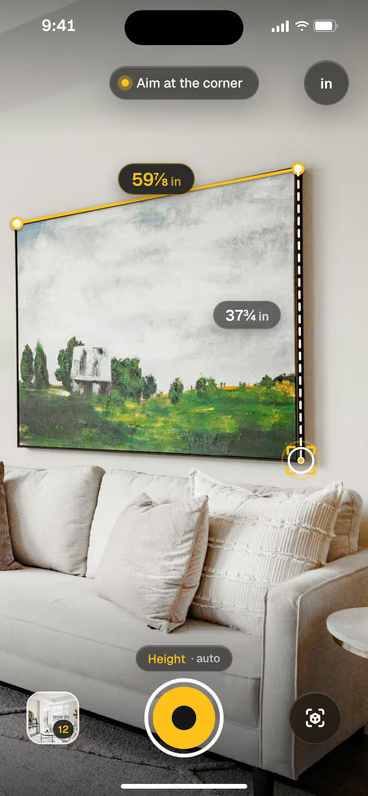
Corner to corner, in two taps. Aim at one corner of the screen and tap, then aim at the opposite corner and tap again. TapePal shows the length in inches and saves it with the photo. For small things, like a charger or a cable end, use its on-screen ruler.

To measure something small on the iPhone screen itself, see the phone ruler. For walls, desks and rooms, see the tape measure app.
Questions
Is laptop screen size measured diagonally?
Yes. Laptop makers state the size as the diagonal of the screen, from one corner to the opposite corner. A 14 in laptop is 14 in corner to corner, not 14 in wide.
Does the bezel count in a laptop's screen size?
No. Only the screen itself counts, from where the picture starts to where it stops. The black border, the bezel and the case are left out.
How do I check my screen size on Windows 11?
Windows doesn't show the size in inches. Type System Information in the Start menu, open it and read the System Model line, then look that model up on the maker's site. Or measure the diagonal with a tape.
Is a 16 in laptop bigger than a 15.6 in?
Taller, not wider. A 16 in screen at 16:10 is about 13⅝ in wide and 8½ in tall. A 15.6 in screen at 16:9 is also about 13⅝ in wide but only 7⅝ in tall.
Will my laptop fit a 15 in sleeve?
Check the laptop's width and depth on its spec sheet, not the screen size. The case is wider than the screen, and sleeves are sized by the laptop, so two 15.6 in laptops can need different sleeves.
How we checked this. Widths and heights are computed from the diagonal and the screen's shape: width = diagonal × W/√(W² + H²) and height = diagonal × H/√(W² + H²), rounded to ⅛ in. MacBook screen sizes are from Apple's technical specifications, which measure the screen diagonally as a standard rectangle. Menu paths are from current macOS and Windows 11. Reviewed by the TapePal team on .