TapePal vs Moasure: measuring rooms and spaces
Moasure review: what the Moasure app and device are, and how TapePal compares with the iPhone you already have: rooms, floor plans and the answer.
 By the TapePal teamUpdated
Short answer
TapePal, which we make, is our pick for measuring at home with the iPhone you already have: lengths, heights and areas with the camera, rooms as 2D plans and 3D models that export to CAD, and the answers to will it fit, how much paint and how much flooring.
What is Moasure?
Moasure is a measuring device you carry along the edge of a space, with a companion app that draws the shape as you walk, according to its App Store listing.
TapePal vs Moasure: how do they compare?
| What you need | Will it fit, paint, flooring | Every measurement saved with its photo | |
|---|---|---|---|
| TapePal | An iPhone or iPad, no LiDAR needed | Yes: all three | Yes, by room and project |
| Moasure | A Moasure device and a phone or tablet | – | – |
- Laser meters: TapePal takes readings from Bluetooth laser meters that send their reading (keyboard mode) and puts them on the plan’s walls.
- 3D: every TapePal plan is also a 3D model you can turn, walk through, see wall by wall and place in AR.
Why people switch from Moasure to TapePal
- You measure rooms, furniture, doors and windows at home, with no extra hardware.
- You want a floor plan in 2D and 3D you can edit by typing a wall’s length, and open in CAD as a DXF.
- You want the answer, not just the size: will the sofa fit through the door and which way, how many gallons of paint, how many boxes of flooring.
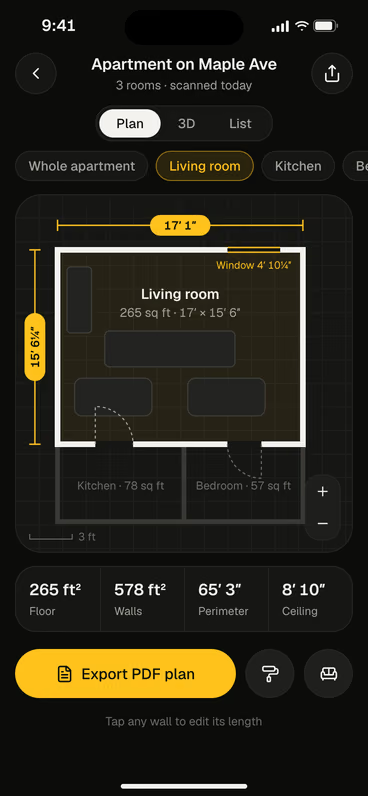
17′ 1″ × 15′ 6″, every wall measured. Scan the room or tap its corners: TapePal draws the plan with every wall, 265 sq ft inside and 65′ 3″ around.

How do you move from Moasure to TapePal?
TapePal doesn’t import Moasure files, so you measure the rooms again with the iPhone and carry over the lengths you trust.
- Export your Moasure drawings Keep a record of what you already measured: export each Moasure drawing as a PDF, or a DXF or DWG for CAD, from the Moasure app.
- Scan or tap each room in TapePal On a Pro iPhone with LiDAR, walk the room to scan it. On any other iPhone, tap each floor corner and type the ceiling height. Each room becomes a 2D plan and a 3D model.
- Type the lengths you trust In the plan editor, tap a wall and type the length from your Moasure drawing or a tape. Add doors and windows, then open Paint, Flooring or Will it fit.
More ways to measure without the device are on our Moasure alternatives page and our tape measure app page. See also TapePal vs Polycam and TapePal vs magicplan.
Questions
Does the Moasure app work without the device?
No. Its App Store listing calls it the companion for Moasure devices; the phone alone doesn't measure in it.
Can TapePal measure a yard or a patio?
Short runs, yes: tap point after point and it adds up the lengths, or trace a small area. The camera works best within a few feet, which is why TapePal is built for rooms, furniture, doors and windows.
How we checked this. What Moasure is comes from its US App Store listing, read on November 10, 2026. Apple's guidance that its Measure app works best 2 to 10 ft away is from Apple's iPhone User Guide. TapePal features come from the app's feature list, checked against its code on November 10, 2026. We make TapePal and don't rate other apps. Reviewed by the TapePal team on .