TapePal vs magicplan: floor plans for your home
magicplan app review: what magicplan is, and how TapePal compares for floor plans of your own home, CAD export and the answer: fit, paint, flooring.
 By the TapePal teamUpdated
Short answer
TapePal, which we make, is our pick for floor plans of your own home: scan each room on a Pro iPhone with LiDAR or tap the floor corners on any other iPhone, and get a 2D plan and a 3D model that exports to CAD (DXF, SVG), USDZ and a PDF report, with the answers to will it fit, how much paint and how much flooring.
What is the magicplan app?
magicplan is a floor plan app for remodeling, restoration and claims professionals. Its App Store listing describes AR and LiDAR scanning that makes floor plans with the camera and no extra hardware, plans with photos, notes, objects and equipment, forms and checklists, 360° panoramas, reports, price lists and estimates, and direct links to Xactimate and CoreLogic.
TapePal vs magicplan: how do they compare?
| Made for | Will it fit, paint, flooring | 3D model of every plan | |
|---|---|---|---|
| TapePal | Homeowners, renters and DIYers measuring their own home | Yes: all three | Yes, with View in AR |
| magicplan | Remodeling, restoration and claims pros | – | – |
- The plan: TapePal lists each room’s floor area, wall area, paintable wall area and ceiling height, with every wall’s length, and lets you type a length, add doors and windows, or draw a wall inside the room.
- 3D: every TapePal plan is also a 3D model, with top, dollhouse, walk-through and elevation views and View in AR.
- Laser meters: TapePal fills the walls from Bluetooth laser meters that send their reading (keyboard mode).
- The report: TapePal’s PDF has a sheet per floor, a page per room to scale, the doors and windows, and estimates for paint, flooring, baseboard and drywall.
Why people switch from magicplan to TapePal
- You measure your own home: furniture, paint, flooring, a move or a renovation.
- You want a plan in 2D and 3D you can correct by typing a length, and open in CAD as a DXF or SVG.
- You want the answer from the plan: whether the sofa goes through the door and which way, how much paint and how many boxes of flooring.
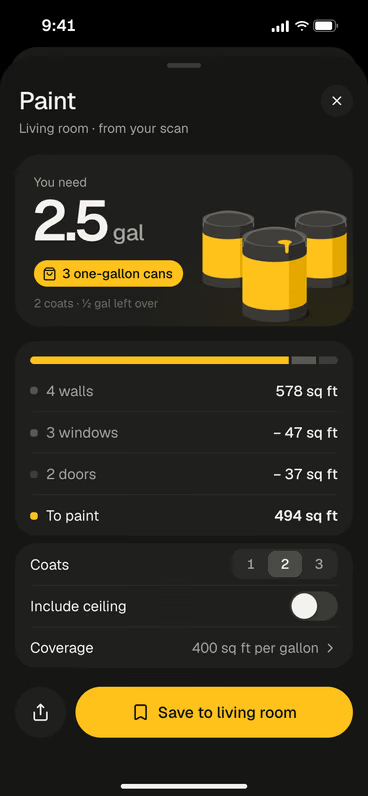
2.5 gal, from the plan. The demo living room: 494 sq ft of wall after the doors and windows, 2 coats, 3 one-gallon cans. Flooring gives 13 boxes from the same plan.

How do you move from magicplan to TapePal?
TapePal doesn’t import magicplan projects, so you measure each room again with the iPhone and type in any wall you know exactly.
- Keep your magicplan reports Export the plans and reports you need from magicplan before you switch, so the jobs you already measured stay on file.
- Scan or tap each room in TapePal Walk the room on a Pro iPhone with LiDAR, or tap each floor corner and type the ceiling height on any other iPhone. Add the next room and the plan grows into the whole home.
- Fix the walls and get the answers Type a wall's exact length or take it from a Bluetooth laser meter, add doors and windows, then open Paint, Flooring or Will it fit, or export the PDF and the DXF.
More on our magicplan alternatives and floor plan app pages. Planning where the furniture goes? See the room layout planner, and for 3D scans, TapePal vs Polycam.
Questions
What is the magicplan app?
A floor plan app for remodeling, restoration and claims professionals. For a floor plan of your own home and the answer, TapePal, which we make: every wall length, a plan you can open in CAD, and will it fit, how much paint and how much flooring.
Is magicplan good for a homeowner?
For the sizes and what to buy at home (whether the sofa fits, the gallons of paint, the boxes of flooring), TapePal, which we make, answers from the plan.
How we checked this. What magicplan is comes from its US App Store listing, read on November 10, 2026. TapePal features come from the app's feature list, checked against its code on November 10, 2026. We make TapePal and don't rate other apps. Reviewed by the TapePal team on .