Home inventory app: rooms, sizes and photos
Use TapePal as a home inventory of rooms: floor plans, measured items with photos, notes and a PDF or CSV export. What it keeps, and what it doesn't.
 By the TapePal teamUpdated 5 min read
Short answer
TapePal, which we make, keeps a home room by room: a measured floor plan of each room, every saved measurement with its photo, sorted by room and project, notes and photos on pins in the plan, and a PDF report or CSV to export. It is not an insurance inventory database: it doesn't record what things cost, receipts or serial numbers. Add those in a spreadsheet from the CSV, or in a dedicated inventory app.
What should a home inventory include?
A list of what is in each room, with photos or video, and the papers that prove it: receipts, model and serial numbers and what each thing is worth. The California Department of Insurance also advises keeping a copy away from the home, with a relative, at work or in a safe deposit box, so a fire or a flood doesn’t take the inventory too.
Most inventory apps are built around that list of belongings and values. TapePal is built around the rooms: their plans, sizes and photos. Here is what it keeps and what it leaves to you.
| Part of the inventory | TapePal | How |
|---|---|---|
| Rooms and floor plans | Yes | A measured 2D plan and 3D model of each room, with floor area, walls, doors and windows |
| Photos of things | Yes | Every measurement saves with its full-size photo |
| Sizes of things | Yes | Width, height and length from the camera, saved by room and project |
| Furniture on the plan | Partly | Found by the LiDAR scan, or added in the plan editor |
| Notes | Yes | Pins on the plan with a note and a photo; a note field on iPad |
| Search | Yes | In the library and from iPhone search |
| Export | Yes | PDF report with photos, CSV, PNG, and DXF, SVG and USDZ plans |
| Values, receipts, serial numbers | No | Add them in a spreadsheet from the CSV |
How do you make a home inventory with TapePal?
- Map each room Scan the room on a Pro iPhone with LiDAR, or tap its floor corners on any other iPhone. Each room becomes a floor plan with every wall measured.
- Measure and photograph what matters Measure the sofa, the TV, the wardrobe and anything you might replace or move. Each measurement saves with its photo; move it into its room or a project.
- Export and keep a copy Export the PDF report with photos and the CSV list, add values and receipts in a spreadsheet, and keep a copy somewhere other than your home.
Start with the rooms you’d struggle to describe after a loss, like the living room and the bedrooms, and the things that cost most to replace. Each measurement gets a name suggested on the device, such as “Looks like a painting”, which you can keep or change.
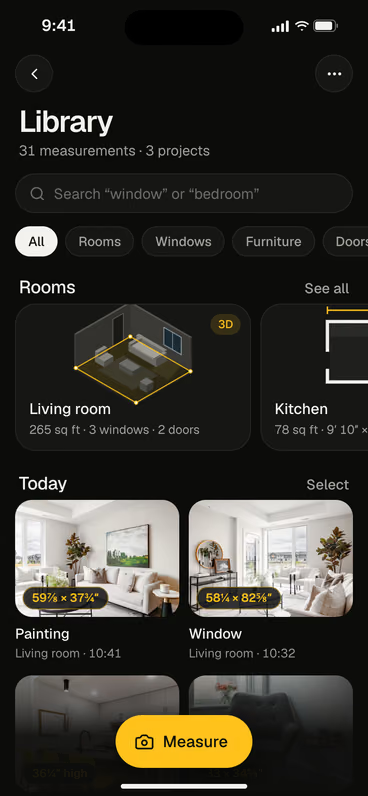
31 sizes, 3 projects. Every measurement with its photo, sorted into rooms and projects. Search for a room or a piece, or pin the sizes you check most.

What does the export look like?
The PDF report has a sheet for the whole floor, a page per room with its plan to scale, the floor area, the walls, doors and windows, and the sizes with their photos. The CSV lists every measurement as a row, or for rooms a full takeoff, which opens in Excel, Numbers or Google Sheets, where you can add a column for the value and one for the receipt. Floor plans also export as DXF and SVG for CAD and as a USDZ 3D model.
Is it useful when you move?
Yes, for the sizes. Keep the measurements of the sofa, the bed and the dresser in a project for the move, then check them against the doors of the new place with Will it fit, or stand them at full size in the new room through the camera. Our guides to moving box sizes and the room layout planner cover the rest of moving day.
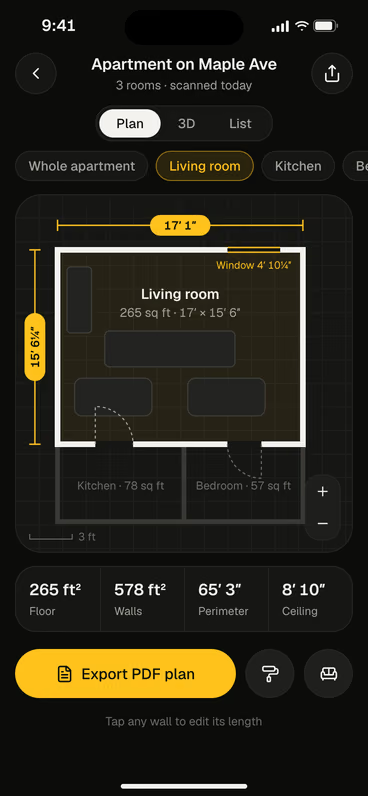
Apartment on Maple Ave, 400 sq ft. The demo apartment: 3 rooms and 4 doors, each wall measured. The plan is also a 3D model you can walk through.
More on making the plans themselves on our floor plan app page.
Questions
Can TapePal replace an insurance inventory app?
No. It records rooms, sizes and photos, not what things cost, where you bought them or their serial numbers. Use its PDF and CSV as the measured part of your inventory, and keep values and receipts alongside.
Does TapePal list my furniture automatically?
Partly. On a Pro iPhone with LiDAR, the room scan finds furniture such as sofas, beds, tables, chairs, TVs, fridges, washers and stoves and puts it on the plan. On any iPhone, you can add a sofa, bed, table or armchair in the plan editor and measure each piece with the camera.
Where are the photos and plans stored?
On your iPhone. TapePal's measurements, photos and room scans never leave the device, so export the PDF and CSV and keep a copy elsewhere, as insurers advise.
Can I add notes to a room?
Yes. Drop a numbered pin on the floor plan with a note, such as a crack, an outlet or a serial number you copied, and an optional photo from your library. On iPad, each measurement also has a note field.
Can I search the inventory?
Yes. Search the library for "sofa" or "bedroom", and iPhone search finds saved sizes by name from the Home Screen.
How we checked this. What a home inventory should hold (each room's contents with photos or video, receipts, serial and model numbers, and a copy kept away from home) is from the California Department of Insurance's home inventory guide, read November 10, 2026. What TapePal records and exports comes from the app's feature list, checked against its code on November 10, 2026. We make TapePal. Reviewed by the TapePal team on .